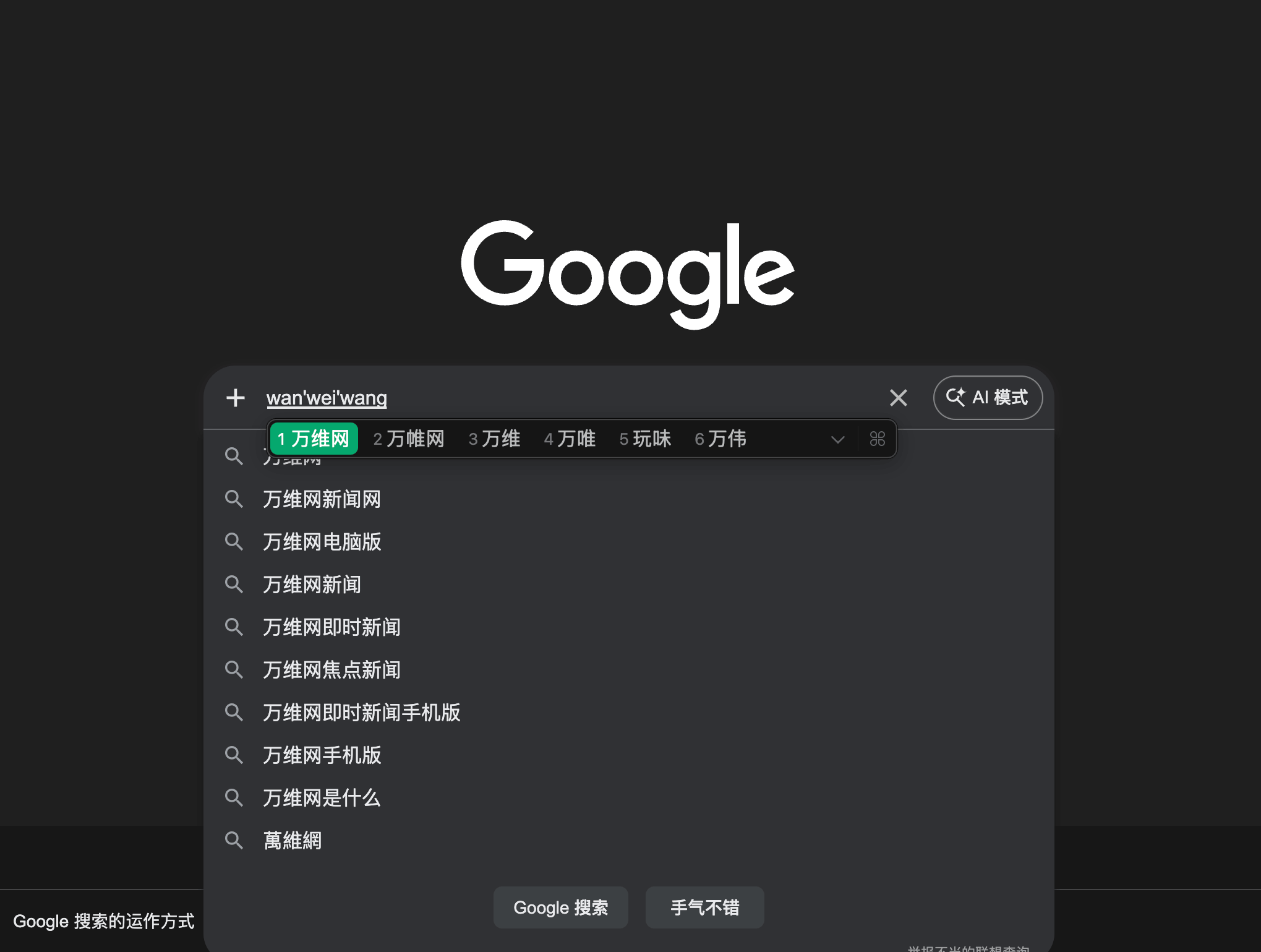
For many languages, especially Chinese, Japanese, and Korean, text is entered through an Input Method Editor (IME). IMEs introduce a composition phase where users build up text before it is committed.
If your application ignores this phase, it can break interactions like chat, search, and forms.
This guide explains how IMEs work on the web, and how to design web applications that behave correctly across browsers.
What IME composition means
An example of IME composition. The user types "wanweiwang" (the pinyin for "万维网").
When a user types with an IME, the browser enters a composition session. During this time, keystrokes update an intermediate string, not the final value. The user may press Enter to select a candidate, not to submit. And the final text is only committed when the composition ends.
Here is a typical worked example:
The user focuses a text field and starts typing n and i with a Japanese IME.
The IME opens a composition session and shows a provisional reading such as に. At this point, the user has not finished entering text yet.
The user keeps typing until the IME shows a longer intermediate string such as nihonngo, together with candidate text such as 日本語.
The user presses Enter to choose that candidate. Here, Enter means "accept this IME choice", not "submit the form".
The browser fires compositionend, commits 日本語 into the input, and only then is the field value ready to be treated as final text.
The core composition model is the same on mobile and desktop, but the interaction details may differ. On desktop, users often rely on hardware keys such as Enter to choose candidates, while on mobile they more often use virtual keyboards and candidate bars. The same rule applies everywhere: treat the text as unfinished while composition is active.
The web platform exposes this state through events and properties, like:
For IME users, pressing Enter during composition selects a candidate. The handler above fires anyway and sends incomplete text.
Respect composition state
Your code must recognize that the user is still in the middle of building text. While composition is active, do not treat the current value as final input.
In practice, that means not submitting on Enter, not running validation that assumes the text is complete, and not triggering shortcuts that could interrupt the IME. Wait until composition ends, then handle the committed text.
Always check whether composition is active before acting on Enter.
This small condition prevents premature submission.
For inputs where users may carefully draft text, such as customer messages or internal approvals, consider making plain Enter insert a line break and using a more deliberate shortcut such as Ctrl+Enter or Cmd+Enter to submit. This reduces accidental sends, but the shortcut should still be ignored while IME composition is active.
Try it yourself
If you have an IME available, switch to the IME and type in both fields and press Enter while the IME is still choosing a candidate. The broken panel will submit too early, while the correct panel will wait until composition has ended.
Watch the composition status line and the submitted-text area under each input as you try the same action in both panels.
Broken handler
Submits on every Enter press, even when composition is active.
Composition status: Idle
Submitted text
Nothing sent yet.
Correct handler
Submits only when Enter is pressed after composition has ended.
Composition status: Idle
Submitted text
Nothing sent yet.
Testing strategies
IME bugs are easy to miss if you only test with standard keyboards.
Use system IMEs for Chinese, Japanese, or Korean to type partial words and press Enter to select candidates, and verify that no submission occurs until composition ends.
Other common IME-related issues
Cursor and selection problems
Re-rendering inputs during composition can:
Reset the cursor
Break candidate selection
Cancel composition unexpectedly
Avoid unnecessary DOM updates while composition is active.
Validation and formatting
Real-time validation or formatting can interfere with IME input.
Do not validate incomplete composition text, and delay formatting until after compositionend.
Shortcut conflicts
Keyboard shortcuts may overlap with IME usage.
Avoid triggering shortcuts during composition, and always check isComposing before acting on key combinations.